ADS NOT DISPLAYED TO REGISTERED USERS.
+ Reply to Thread
Results 1 to 12 of 12

Lancaster 1/72 camouflage

Painting Questions, Tutorials and Guidebooks Discuss Lancaster 1/72 camouflage in the Modeling forums; Hi All, Since i'm restarting the hobby and after some tryouts with smaller acft, (spitfire, Bf109, Fw190...) I'm going to ...

  1. #1
    jco
    jco is offline
    Junior Member
    Join Date
    May 2010
    Posts
    4
    Country
    United States

    Lancaster 1/72 camouflage

    Hi All,

    Since i'm restarting the hobby and after some tryouts with smaller acft, (spitfire, Bf109, Fw190...) I'm going to start on the Avro lancaster (by Revell). Currently I'm looking to create a mask for painting (airbrush) the camouflage on top of the airplane. I rather have this done not freehand, can you provide me (aid me) in creating a template for this. I tried it with the drawings I found in SAM Lancaster publications, but this is scale 1/144 and when I try to copy this to 200% on the copier, I get 1 A3 sheet with partial sections, since obvious not all fits on 1 sheet. Also it seems that the result I have is not exactly scaled to 1/72 bacause I'm missing several Centimeters if I compare this with my model. Just want to make this as real as I can get.

    regards,
    Johan


  2. #2
    Siggy Master Wurger's Avatar
    Join Date
    Jun 2005
    Location
    Poland
    Posts
    27,572
    Country
    Poland
    What kind of a copier do you use?

  3. #3
    jco
    jco is offline
    Junior Member
    Join Date
    May 2010
    Posts
    4
    Country
    United States
    I use a canon copier at work, I just set page size to A3 and zoom 200%, I cannot remember the exact canon copier type but will fwdd this tom.

    thanks and kind regards,
    jco

  4. #4
    Siggy Master Wurger's Avatar
    Join Date
    Jun 2005
    Location
    Poland
    Posts
    27,572
    Country
    Poland
    I see. Is there a possibility to input to the copier the number of ratio for resizing up or down of a pic?

  5. #5
    Senior Member FlexiBull's Avatar
    Join Date
    Feb 2009
    Posts
    279
    Country
    Scotland
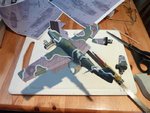
    Not sure if this will make sense but here goes.
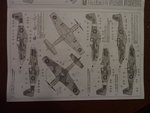
    Most kits have a camouflage scheme included.
    Get a digital camera and take an image of the scheme.
    Upload to your PC.
    Use a drawing programme that has a dimensioning tool.
    Calculate the wingspan of your model and stretch the jpg to this dimension.
    Print out and cut out the panels.

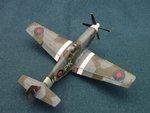
    Used this on my P51 Mustang III.

    One word of warning just check that top elevation is the same scale as the side elevation. I stretched the image for the correct fuselage length thinking that this would automatically be correct for the upper surface of the wings, but they seemed to be different scales.
    Attached Thumbnails Attached Thumbnails Lancaster 1/72 camouflage-p1020687-medium-.jpg   Lancaster 1/72 camouflage-p1020609-medium-.jpg  

    Lancaster 1/72 camouflage-p1020917-medium-.jpg  

  6. #6
    Senior Member FlexiBull's Avatar
    Join Date
    Feb 2009
    Posts
    279
    Country
    Scotland
    Oh sorry - welcome to the forum.

  7. #7
    Benevolens Magister Airframes's Avatar
    Join Date
    Aug 2008
    Posts
    33,131
    Country
    United Kingdom
    Welcome to the forum, and good tips from Flexibull. You'll find that most, if not all copiers, work to a different system for enlargement reproduction, and it's a real pain in the nether regions! I'm used to working with graphic - reproduction process cameras, where enlargement and reduction is logical, for example, 1/48th scale up to 1/32nd scale is = 150% enlargement - simple!
    Copiers however use a ratio for the paper or copier bed size, so a calcualtion has to be made to achieve a nearly correct enlargement size to input, which will still not be accurate! Copier operators, for instance at 'Copy Shops' and similar establishments, will know how to do this, but I haven't a clue!

  8. #8
    jco
    jco is offline
    Junior Member
    Join Date
    May 2010
    Posts
    4
    Country
    United States
    Flexibull,

    Thanks will surely try this, and he when I start this project I will post this so you all could follow up on things.
    btw does PAINT.Net or GIMP has a dimensioning tool, cause with paint.net I can only resize the entire image or are you using other software?
    regards,
    jco
    Last edited by jco; 05-07-2010 at 08:59 AM. Reason: additional question

  9. #9
    Senior Member Migrant's Avatar
    Join Date
    Aug 2008
    Location
    Calgary AB
    Posts
    225
    Country
    Canada
    Country II
    England
    As Airframes alluded to, it's more straightforward if you can scan the paint diagram into your computer, resize in a photo-editing program (I use Photoshop) and then print it out. There isn't a set scale, since the paint/decal diagrams vary from kit to kit, but I use a simple formula. I measure a specific distance on the kit itself- usually wingspan since it's easy to measure. I then measure the wingspan on the paint diagram, and divide it into the kit's measurements.

    eg 7.5" (the kit's wingspan) divided by 4.2" (the wingspan of the paint diagram) = 1.785
    Move the decimal point 2 places to express as a percentage, and you get 178.5% – the enlargement necessary to make the diagram the same size/scale as the kit.

    Once printed the shapes can be cut out and attached to the model with little blobs of BluTack, just enough to hold the paper off the model's surface. The result is a tight, but soft, edge:


    Last edited by Migrant; 05-10-2010 at 07:24 PM. Reason: Too quick on the 'reply' button...

  10. #10
    Senior Member FlexiBull's Avatar
    Join Date
    Feb 2009
    Posts
    279
    Country
    Scotland
    Ah that's the magic missing word "scan"!

    If you don't have a scanner, then the quickest way is an image from a digital camera.

    @ jco the program I use is Serif DrawPlus 7, there are several versions and I think most have the dimension tool. In the UK you can often pick up a free program of a older version. Quite simple, but quite useful.

  11. #11
    Senior Member FlexiBull's Avatar
    Join Date
    Feb 2009
    Posts
    279
    Country
    Scotland
    Ah that's the magic missing word "scan"!

    If you don't have a scanner, then the quickest way is an image from a digital camera.

    @ jco the program I use is Serif DrawPlus 7, there are several versions and I think most have the dimension tool. In the UK you can often pick up a free program of a older version. Quite simple, but quite useful.

  12. #12
    jco
    jco is offline
    Junior Member
    Join Date
    May 2010
    Posts
    4
    Country
    United States

    Smile

    Thanks for this, In the meantime I have almost the result I need. I'm using paint.net for this with a extra plugin print+.
    Regards,

+ Reply to Thread

Similar Threads

  1. RAF Markings and Camouflage
    By Micdrow in forum Aircraft Markings and Camouflage
    Replies: 134
    Last Post: 07-29-2011, 10:36 AM
  2. Dornier Do-17 E/F camouflage
    By Bullo Loris in forum Aircraft Markings and Camouflage
    Replies: 2
    Last Post: 03-14-2010, 06:30 PM
  3. Unusual camouflage....
    By Lucky13 in forum Painting Questions, Tutorials and Guidebooks
    Replies: 5
    Last Post: 05-02-2009, 04:40 PM
  4. Camouflage.....
    By Lucky13 in forum WW2 General
    Replies: 7
    Last Post: 06-23-2008, 08:34 PM
  5. Camouflage
    By Fatucmean in forum Painting Questions, Tutorials and Guidebooks
    Replies: 4
    Last Post: 03-03-2007, 05:35 PM

Bookmarks

Posting Permissions

  • You may not post new threads
  • You may not post replies
  • You may not post attachments
  • You may not edit your posts

1 2 3 4 5 6 7 8 9 10 11 12 13 14 15 16 17 18 19 20 21 22 23 24 25 26 27 28 29 30 31 32 33 34 35 36 37 38 39 40 41 42 43 44 45 46 47 48 49 50 51 52 53 54 55 56 57 58 59 60 61 62 63 64 65 66 67 68 69 70 71 72 73 74 75 76 77 78 79 80 81 82 83 84 85 86