ADS NOT DISPLAYED TO REGISTERED USERS.
+ Reply to Thread
Page 1 of 14 1 2 3 4 5 6 7 8 9 10 11 ... LastLast
Results 1 to 15 of 202

Practising Paintshop/GIMP...

Signature/General Pics Upload Discuss Practising Paintshop/GIMP... in the Website forums; I don't need a new siggy right now, but I'm just practising with my program to learn how to use ...

  1. #1
    Senior Member Marcel's Avatar
    Join Date
    Sep 2006
    Location
    Dordrecht
    Posts
    5,271
    Country
    Netherlands

    Practising Paintshop/GIMP...

    I don't need a new siggy right now, but I'm just practising with my program to learn how to use it and I want to see what it looks like on the web.(Les' thread came in useful ). When I make one, I'll post it here, directions are welcome. Maybe I'll use one of these as a siggy in future

    Attached Images  
    Last edited by Marcel; 07-05-2008 at 03:55 PM.

    My band: red beat

  2. #2
    Siggy Master Wurger's Avatar
    Join Date
    Jun 2005
    Location
    Poland
    Posts
    27,918
    Country
    Poland
    Very nice idea Marcel.I like it.

  3. #3
    Senior Member Marcel's Avatar
    Join Date
    Sep 2006
    Location
    Dordrecht
    Posts
    5,271
    Country
    Netherlands
    You have this nice way of using fonts, Wurger, is that a Photoshop thingy?

  4. #4
    Siggy Master Wurger's Avatar
    Join Date
    Jun 2005
    Location
    Poland
    Posts
    27,918
    Country
    Poland
    Yep it is, but the way of its using is my idea mostly.

  5. #5
    Senior Member Marcel's Avatar
    Join Date
    Sep 2006
    Location
    Dordrecht
    Posts
    5,271
    Country
    Netherlands
    New techniques, but not satisfied with the hard edges of the Vimy
    Attached Images  

  6. #6
    World Travelling Doctor? Gnomey's Avatar
    Join Date
    Nov 2004
    Location
    Royal Deeside/Swansea, UK
    Posts
    29,090
    Country
    United Kingdom
    Looking good though Marcel despite the roughness of it - will disappear with enough practice. Both sigs are a bit big though (although I'm assuming here you would downsize them before using them).


    "Success is not Final, Failure is not Fatal, it is the Courage to Continue that Counts"
    Sir Winston Churchill

    "To him the People of the World Largely owe the Freedom and Liberties they Enjoy Today"
    Enscription on Hugh Dowding's (AOC Fighter Command 1936-40) statue in London


    My Photo Collections on Flickr

  7. #7
    Siggy Master Wurger's Avatar
    Join Date
    Jun 2005
    Location
    Poland
    Posts
    27,918
    Country
    Poland
    I agree with Gnomey.But Marcel, as you use fonts for a signature it is better to make them much more contrast to the background ( especially when these are made of the background pic like there in your pic) becaus when a pic is downsized these become less vissible.The best solution is to cut them off the background and put separately to the one.What is more you can use outline and shadow to make them contrasted.

  8. #8
    Senior Member trackend's Avatar
    Join Date
    Dec 2003
    Location
    Canvey Island, Essex
    Posts
    4,040
    Country
    England
    Only just brought PShop CS3 marcel and I have a headache already bloody hell its complicated

  9. #9
    Senior Member Marcel's Avatar
    Join Date
    Sep 2006
    Location
    Dordrecht
    Posts
    5,271
    Country
    Netherlands
    Gnomey: Thanks, I would indeed make them smaller if they were real siggies, but I thought on this scale, it would be easier then fiddling with lowres. And I'll keep on trying

    Wurger: I agree, I wanted to see how they turned out. These kind of fonts probably work better on a less crowded background, I think.
    I didn't quite understand what you mean with: "The best solution is to cut them off the background and put separately to the one."

    Quote Originally Posted by trackend View Post
    Only just brought PShop CS3 marcel and I have a headache already bloody hell its complicated
    That's why I have Paintshop Pro. I saw Photoshop with a friend, but I too thought it was too complicated. PPro is also complicated, but has a very good user interface.

  10. #10
    Siggy Master Wurger's Avatar
    Join Date
    Jun 2005
    Location
    Poland
    Posts
    27,918
    Country
    Poland
    Quote Originally Posted by Marcel View Post
    I didn't quite understand what you mean with: "The best solution is to cut them off the background and put separately to the one."

    Oh...sorry.I meant that it is better to add to the font a texture made of the background and a shadow.If the font layer is above the background one the effect is clearly visible.

  11. #11
    Siggy Master Wurger's Avatar
    Join Date
    Jun 2005
    Location
    Poland
    Posts
    27,918
    Country
    Poland
    And here is an example of it.
    Attached Images                

  12. #12
    Senior Member Marcel's Avatar
    Join Date
    Sep 2006
    Location
    Dordrecht
    Posts
    5,271
    Country
    Netherlands
    Thanks, Wurger, I'll have a try at that, first I have to figure out how to do that in Paintshop

  13. #13
    Siggy Master Wurger's Avatar
    Join Date
    Jun 2005
    Location
    Poland
    Posts
    27,918
    Country
    Poland
    Ah ...I was sure you know.

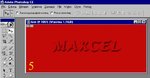
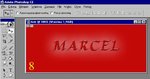
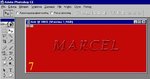
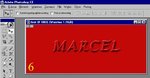
    So OK. Here you are the "recipe".

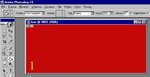
    1. open the new project - pic1
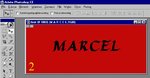
    2. click text menu and input a text - pic2
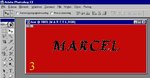
    3. hit the Ctrl key together with click left mouse button on the name of text layer name in the window with all layers.The text should be marked.Go to the background layer - pic3
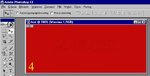
    4. then Ctrl+C keys nad then Ctrl+V. - pic4
    5. go to the window with layer effects to add a shape and a relief for instance. - pic5
    6.The effect should be like this one. - pic6
    7 and 8. Some different settings in a shape menu and outer light added to the layer. - pics 7and 8

    Clear now?
    Last edited by Wurger; 07-08-2008 at 10:32 AM.


  14. #14
    Senior Member Marcel's Avatar
    Join Date
    Sep 2006
    Location
    Dordrecht
    Posts
    5,271
    Country
    Netherlands
    I was actually referring to the effects and how they work in Paint shop pro, as compared to photoshop, but thanks anyway.
    Last edited by Marcel; 07-08-2008 at 02:02 PM.

    My band: red beat

  15. #15
    Senior Member Marcel's Avatar
    Join Date
    Sep 2006
    Location
    Dordrecht
    Posts
    5,271
    Country
    Netherlands
    Okay, practised a little with the text. I think the 3d effects in Paintshop are a little too subtile (or I have to play with it a little more). The effect "Chisel" seems quite useful to let text stand out from the background. The "Button" effect doesn't seen to help, the "outerbevel" alone doesn't work alone (as you could see above), but used together with "Chisel", the effect is a little better(see first pic). "Innerbevel" works quit nicely, but I think it's ugly this way, have to ajust the settings for that (pic 2). Chinsel with a little brighter text selection seems to enhance visibillity as well (pic 3).

    Later: Played with the "Inner Bevel", pic 4
    Pic 5: 4 with Drop shadow
    Attached Images          
    Last edited by Marcel; 07-08-2008 at 03:05 PM.

    My band: red beat

+ Reply to Thread
Page 1 of 14 1 2 3 4 5 6 7 8 9 10 11 ... LastLast

Bookmarks

Posting Permissions

  • You may not post new threads
  • You may not post replies
  • You may not post attachments
  • You may not edit your posts

1 2 3 4 5 6 7 8 9 10 11 12 13 14 15 16 17 18 19 20 21 22 23 24 25 26 27 28 29 30 31 32 33 34 35 36 37 38 39 40 41 42 43 44 45 46 47 48 49 50 51 52 53 54 55 56 57 58 59 60 61 62 63 64 65 66 67 68 69 70 71 72 73 74 75 76 77 78 79 80 81 82 83 84 85 86 87 88